Integrations and triggers
Every recipe General Caster adds to monday.com, when it can run and which plan it needs.
Available recipes
| Recipe | Item created | Column changes | Any column changes | Status changes | Plan |
|---|---|---|---|---|---|
| Perform formula and cast result to column | Free | ||||
| Perform formula and cast result to mirrored column | Standard | ||||
| Perform formula and cast result to item name | Standard | ||||
| Convert currency | Standard | ||||
| Create barcode and upload to column | Pro | ||||
| Create barcode and upload to update | Pro | ||||
| Auto-increment/decrement Number column | Pro | ||||
| Create map and upload to column | Enterprise | ||||
| Create map and upload to update | Enterprise |
If you installed General Caster v1 a long time ago, the newer recipes may be missing. Install it again to get the latest version: your existing recipes keep working.
Choosing the trigger
- When an item is created: runs once, for values that never change, like a code or a default due date.
- When column changes: runs when one specific column changes. It is the most efficient choice when the formula depends on one column.
- When any column changes: runs on every change of the item. Convenient for formulas that read many columns, but it uses more operations.
- When status changes: runs when a Status column changes, optionally to a specific label.
See the monday.com documentation for how triggers count as actions in your monday.com plan.
Target columns
The formula recipes can write into most column types: Text, Long text, Numbers, Status, Dropdown, Date, Timeline, Week, Hour, Link, Email, Phone, Location, Country, Rating, Checkbox, World clock, Tags, People and Connect boards. Each type expects its own format, described in Column values.
Casting into the item name, into a People column or into a column of another board requires a paid plan.
Casting into a mirrored column
A mirrored column shows values from items connected in another board. With the recipe perform formula and cast result to mirrored column, General Caster writes the result into the original column of the connected item. This is how you move data across boards.
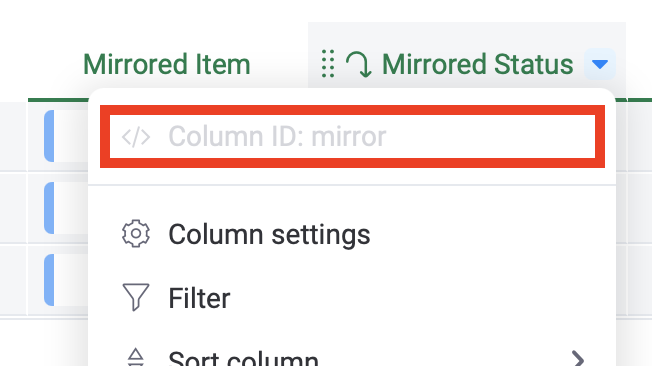
monday.com doesn't list mirrored columns in the recipe dropdown, so this recipe asks you to type the ID of the mirrored column:
- Enable Developer mode: click your profile picture > monday.labs > activate Developer mode.
- Open the menu of the mirrored column: its ID is shown at the top.
- Type that ID in the recipe.
The recipe doesn't work when the Connect boards column is connected to more than one board.
Something unclear or missing? Tell us and we'll improve this page.