Ideas

Formulas ready to copy

Solutions to everyday monday.com problems. Copy a formula, paste it into General Caster and replace the column references with your own.

Column references

References like {item's Date} are examples. In the formula editor, delete them and click the button of your own column at the bottom of the editor to insert the right reference. How references work

Emails of the assignees New

People Text

Write the email addresses of the people assigned to an item, for example to use them in an email integration or an export.

MONDAY.PEOPLE.EMAIL({item's Person})
You need
One People column and one Text column
Recipe
When column changes, perform formula and cast result to column
Functions
MONDAY.PEOPLE.EMAIL

Assign by department New

Status People

When the department of a request changes, assign it to the right person using their email.

SWITCH({item's Department}, "Sales", "[email protected]", "Support", "[email protected]", "DO-NOTHING")
You need
One Status column and one People column (Standard plan or higher)
Recipe
When column changes, perform formula and cast result to column
Functions
SWITCH

Quarter from a date New

Date Status

Label each item with its quarter, like Q4 2026, to group and filter the board by quarter. Missing labels are created automatically.

CONCATENATE("Q", ROUNDUP(MONTH(DATEVALUE({item's Date})) / 3, 0), " ", YEAR(DATEVALUE({item's Date})))
You need
One Date column and one Status (or Dropdown, or Text) column
Recipe
When column changes, perform formula and cast result to column
Functions
CONCATENATE ROUNDUP MONTH DATEVALUE YEAR

Week from a date New

Date Week

Fill a Week column with the week (Monday to Sunday) that contains the date.

CONCATENATE(TEXT(DATEVALUE({item's Date}) - WEEKDAY(DATEVALUE({item's Date}), 3), "YYYY-MM-DD"), "+", TEXT(DATEVALUE({item's Date}) - WEEKDAY(DATEVALUE({item's Date}), 3) + 6, "YYYY-MM-DD"))
You need
One Date column and one Week column
Recipe
When column changes, perform formula and cast result to column
Functions
CONCATENATE TEXT DATEVALUE WEEKDAY

On time or late New

Two dates Status

When an order is delivered, compare the delivery date with the due date and set On time or Late.

IF(DATEVALUE({item's Delivered}) <= DATEVALUE({item's Due date}), "On time", "Late")
You need
Two Date columns and one Status column
Recipe
When column changes, perform formula and cast result to column
Functions
IF DATEVALUE

Days in a timeline New

Timeline Numbers

Count the calendar days of a timeline, weekends included, first and last day included.

DAYS(DATEVALUE(RIGHT({item's Timeline}, 10)), DATEVALUE(LEFT({item's Timeline}, 10))) + 1
You need
One Timeline column and one Numbers column
Recipe
When column changes, perform formula and cast result to column
Functions
DAYS DATEVALUE RIGHT LEFT

Total with discount New

Numbers Numbers

Calculate the total of an order line from price, quantity and discount percentage, rounded to cents.

ROUND({item's Price} * {item's Quantity} * (1 - {item's Discount} / 100), 2)
You need
Three Numbers columns for the inputs and one for the total
Recipe
When any column changes, perform formula and cast result to column
Functions
ROUND

Profit margin New

Numbers Numbers

Calculate the margin percentage from price and cost, to sort products or deals by profitability.

ROUND(({item's Price} - {item's Cost}) / {item's Price} * 100, 1)
You need
Two Numbers columns for price and cost and one for the margin
Recipe
When any column changes, perform formula and cast result to column
Functions
ROUND

Reorder when stock is low New

Numbers Checkbox

Check a Reorder checkbox when the stock falls below the reorder level, then let a monday.com automation notify the buyer.

IF({item's Stock} < {item's Reorder level}, TRUE, FALSE)
You need
Two Numbers columns and one Checkbox column
Recipe
When any column changes, perform formula and cast result to column
Functions
IF

Project code New

Text + Date Text

Build a readable code from the first three letters of the client and the year and month of the project, like ACM-2610.

CONCATENATE(UPPER(LEFT({item's Client}, 3)), "-", TEXT(DATEVALUE({item's Date}), "YYMM"))
You need
One Text column, one Date column and one Text column for the code
Recipe
When any column changes, perform formula and cast result to column
Functions
CONCATENATE UPPER LEFT TEXT DATEVALUE

Due date after N working days

Date + Numbers Date

When you set a start date, set the due date after the number of working days written in a Numbers column.

TEXT(WORKDAY(DATEVALUE({item's Date}), {item's Number}), "YYYY-MM-DD")
You need
Two Date columns and one Numbers column
Recipe
When any column changes, perform formula and cast result to column
Functions
TEXT WORKDAY DATEVALUE

Timeline from a date

Date Timeline

When you set a date, set a timeline that starts 7 days later and ends 21 days later.

CONCATENATE(TEXT(DATEVALUE({item's Date}) + 7, "YYYY-MM-DD"), "+", TEXT(DATEVALUE({item's Date}) + 21, "YYYY-MM-DD"))
You need
One Date column and one Timeline column
Recipe
When column changes, perform formula and cast result to column
Functions
CONCATENATE TEXT DATEVALUE

Shift a timeline

Timeline Timeline

When you set a timeline, set another timeline moved 14 days into the future.

CONCATENATE(TEXT(DATEVALUE(LEFT({item's Timeline}, 10)) + 14, "YYYY-MM-DD"), "+", TEXT(DATEVALUE(RIGHT({item's Timeline}, 10)) + 14, "YYYY-MM-DD"))
You need
Two Timeline columns
Recipe
When column changes, perform formula and cast result to column
Functions
CONCATENATE TEXT DATEVALUE LEFT RIGHT

Next birthday

Date Date

When you set a birth date, set the date of the next birthday.

CONCATENATE(YEAR(TODAY()) + IF(TODAY() > DATEVALUE(CONCATENATE(YEAR(TODAY()), RIGHT({item's Birth Date}, 6))), 1, 0), RIGHT({item's Birth Date}, 6))
You need
Two Date columns
Recipe
When any column changes, perform formula and cast result to column
Functions
CONCATENATE YEAR TODAY IF DATEVALUE RIGHT

When a task is created, set its due date to the first Monday of the current month.

TEXT(DATE(YEAR(TODAY()), MONTH(TODAY()), 7) - WEEKDAY(DATE(YEAR(TODAY()), MONTH(TODAY()), 7), 3), "YYYY-MM-DD")
You need
One Date column
Recipe
When an item is created, perform formula and cast result to column
Functions
TEXT DATE YEAR TODAY MONTH WEEKDAY

Working days in a timeline

Timeline Numbers

Count the working days between the start and the end of a timeline.

NETWORKDAYS(DATEVALUE(LEFT({item's Timeline}, 10)), DATEVALUE(RIGHT({item's Timeline}, 10)))
You need
One Timeline column and one Numbers column
Recipe
When column changes, perform formula and cast result to column
Functions
NETWORKDAYS DATEVALUE LEFT RIGHT

Working hours between two dates

Date + time Numbers

Count the working hours between two dates with time, on a 09:00–18:00 schedule.

((NETWORKDAYS(DATEVALUE({item's From DateTime}), DATEVALUE({item's To DateTime})) - 1) * (TIMEVALUE("18:00") - TIMEVALUE("09:00")) + IF(NETWORKDAYS({item's To DateTime}, {item's To DateTime}), MEDIAN(MOD(TIMEVALUE({item's To DateTime}), 1), TIMEVALUE("18:00"), TIMEVALUE("09:00")), TIMEVALUE("18:00")) - MEDIAN(NETWORKDAYS(DATEVALUE({item's From DateTime}), DATEVALUE({item's From DateTime})) * MOD(TIMEVALUE({item's From DateTime}), 1), TIMEVALUE("18:00"), TIMEVALUE("09:00"))) * 24
You need
Two Date columns with time and one Numbers column
Recipe
When column changes, perform formula and cast result to column
Functions
NETWORKDAYS DATEVALUE TIMEVALUE IF MEDIAN MOD

Rating from a budget

Numbers Rating

Give each item a rating from 1 to 5 based on its budget.

IF({item's Number} > 100000, 5, IF({item's Number} > 75000, 4, IF({item's Number} > 50000, 3, IF({item's Number} > 25000, 2, 1))))
You need
One Numbers column and one Rating column
Recipe
When column changes, perform formula and cast result to column
Functions
IF

Set a clickable email address based on the status of the item.

SWITCH({item's Status}, "Tim", "[email protected]:Tim Apple", "Jeff", "[email protected]:Jeff Amazon", "")
You need
One Status column with the labels "Tim" and "Jeff", and one Email column
Recipe
When column changes, perform formula and cast result to column
Functions
SWITCH

Address from a location

Location Text

Copy the address of a Location column into a Text column.

RIGHT({item's Location}, LEN({item's Location}) - FIND(":", {item's Location}, FIND(":", {item's Location}) + 1))
You need
One Location column and one Text column
Recipe
When column changes, perform formula and cast result to column
Functions
RIGHT LEN FIND

Create a link that opens a WhatsApp chat with the phone number of the item.

CONCATENATE("http://wa.me/", LEFT({item's Phone}, FIND(":", {item's Phone}) - 1), ":WhatsApp")
You need
One Phone column and one Link column
Recipe
When column changes, perform formula and cast result to column
Functions
CONCATENATE LEFT FIND

Count a word in subitems

Subitems Numbers

Count how many times "Apple" appears in a column of the subitems.

(LEN({item's Subitems Text}) - LEN(SUBSTITUTE({item's Subitems Text}, "Apple", ""))) / LEN("Apple")
You need
One subitems summary column (you can hide it) and one Numbers column
Recipe
When any column changes, perform formula and cast result to column
Functions
LEN SUBSTITUTE

Mirrored and subitems summary columns return all values joined by "+". Keep only the last one.

TRIM(RIGHT(SUBSTITUTE({item's Mirrored Column}, "+", REPT(" ", 999)), 999))
You need
One mirrored (or subitems summary) column and one Text column
Recipe
When any column changes, perform formula and cast result to column
Functions
TRIM RIGHT SUBSTITUTE REPT
Use cases

Workflows built with General Caster

Complete solutions that combine General Caster with monday.com automations.

Cross-board dependencies

By Didier Bollag, Onboarding Success Manager at monday.com

The problem

Tasks in one board depend on tasks in another board, and any delay of the predecessors should move the dependent timelines. Dependency automations don't work across boards.

The solution

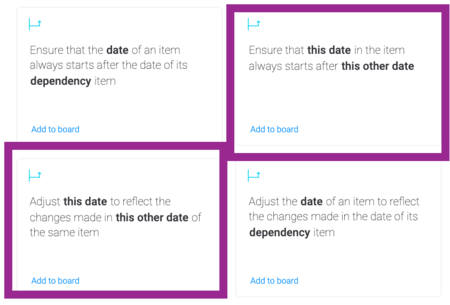
Mirror the predecessor timeline into the dependent board with "When column changes, perform formula and cast result to mirrored column" (the formula is just the timeline column). Then the item-level dependency automations of the dependent board move the timelines.

Dependency automations used in this workflow

Baseline of a waterfall project

By Didier Bollag, Onboarding Success Manager at monday.com

The problem

See how long a project will take from a start date and the work days each task needs.

The solution

One formula adds the work days to the start date, a second one builds the timeline from the two dates, and the dependency automation starts each task when its predecessor ends.

TEXT(WORKDAY(DATEVALUE({item.date}), {item.number}), "YYYY-MM-DD")
CONCATENATE({item.date_16}, "+", {item.date_17})

Built something clever with General Caster? We'd love to feature it.

Share your use case